This project continues the existingphotogrammetry + 3D Gaussian Splatting (3DGS) hybrid reconstruction pipelineand has now productised it for Unreal Engine. The real world is not only rebuilt into something viewable in three dimensions; it can enter a simulation level directly and run alongside dynamic objects, sensors and the data capture flow.
The newIAGaussianRenderertargets Unreal Engine 5.8 and loads standard 3DGS.plyfiles and ordinary coloured point clouds directly. It connects the existing high-fidelity reconstruction capability to UE scenes, Blueprint and the IADataSDG pipeline, so a real site can be used for digital twins, problem replay, algorithm training and closed-loop evaluation.
Demonstration
The existing real-time walkthrough of a Gaussian scene remains available:
Real-time walkthrough of a 3D Gaussian reconstruction
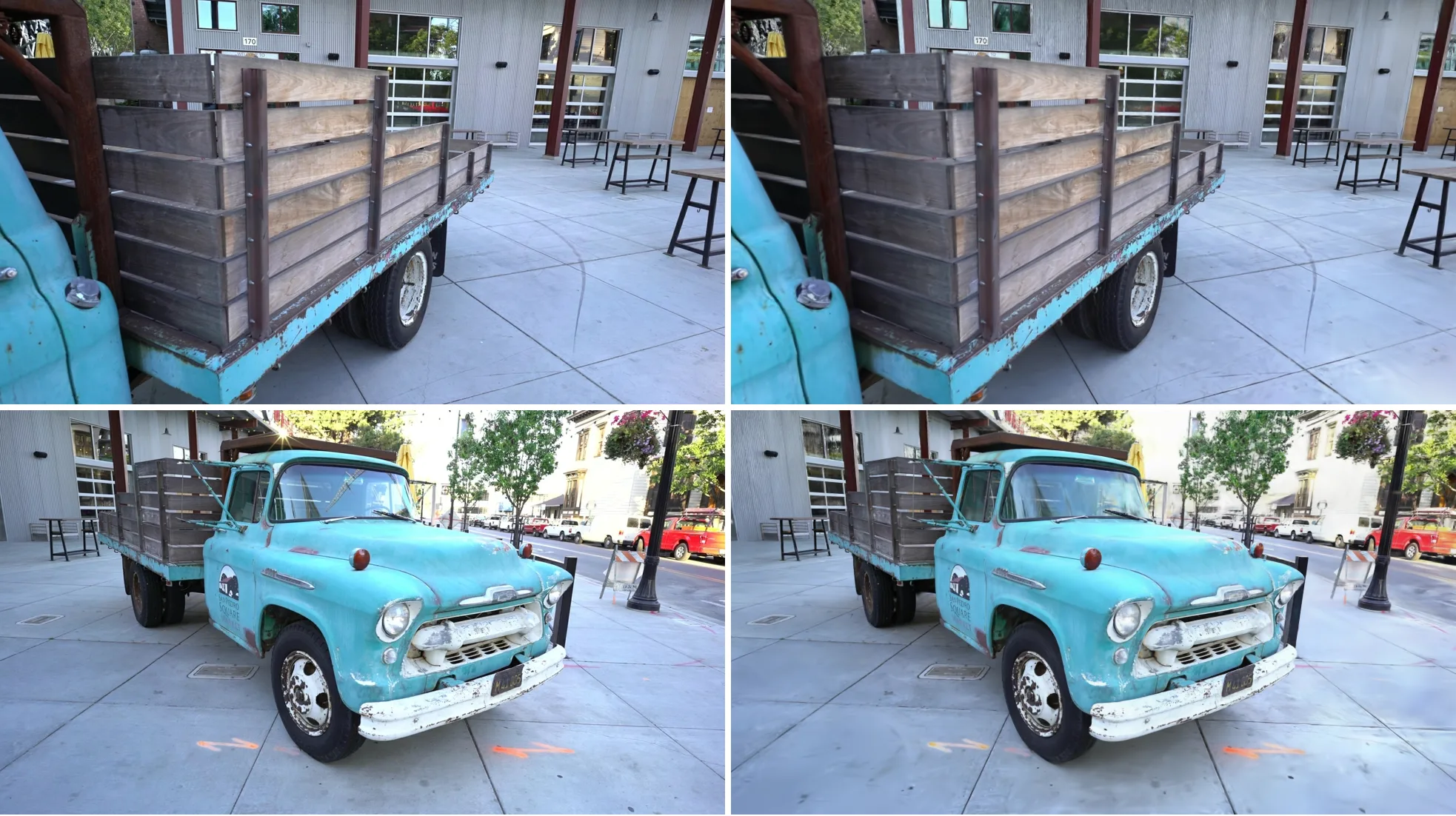
The comparisons below are taken from a public benchmark dataset. On the left is the photograph, on the right the IAGaussianRenderer output in UE 5.8. The top row is the best view, the bottom row the median view.
Truck scene: best view24.77 dB, median view22.44 dB.
Train scene: best view27.32 dB, median view21.47 dB.
A 2× local detail comparison at the median view of Truck:
The technical core
1. A hybrid reconstruction pipeline
We did not treat 3DGS as an isolated algorithm. The stable geometric foundation of traditional photogrammetry and the visual expressiveness of differentiable rendering are combined into one pipeline:
- Sparse point cloud initialisation: COLMAP runs SfM (structure from motion) to solve camera poses and produce a sparse point cloud, giving the later optimisation reliable spatial coordinates and a geometric prior.
- 3DGS optimisation: anisotropic 3D Gaussians are initialised from the sparse cloud, and differentiable rasterisation iteratively optimises position, rotation, scale, opacity and spherical harmonic coefficients until novel-view renders approach the photographs.
- Geometric constraint reinforcement: depth and normal map constraints suppress floating artefacts in weakly textured regions and improve structural stability.
- Engine delivery: a standard PLY is emitted and loaded straight into UE by IAGaussianRenderer, where it combines with mesh assets, dynamic objects and sensors in one coordinate system.
2. From point cloud to anisotropic Gaussians
An ordinary point cloud records only discrete position and colour. Each Gaussian primitive in 3DGS also carries shape, orientation, transparency and a view-dependent colour expression:
- Position: the centre of the Gaussian in three-dimensional space;
- Covariance: describes the scale, shape and orientation of the ellipsoid;
- Opacity: controls how much this Gaussian contributes to the final pixel;
- Spherical harmonic coefficients: express colour and specular highlights that vary with viewing direction.
The covariance can be parameterised by rotation and scale:
This explicit representation keeps the easy parallelism of point primitives while covering complex surfaces and fine detail through anisotropic ellipsoids.
3. Differentiable rasterisation
At render time each 3D Gaussian is projected into a 2D ellipse in screen space, sorted by depth and composited with forward alpha blending. A pixel's colour is the joint contribution of the visible Gaussians:
Unlike hard 0/1 occlusion, a Gaussian's contribution is continuous and differentiable. The error between photograph and render can be back-propagated into position, covariance, opacity and spherical harmonic coefficients, which gives end-to-end optimisation. Explicit primitives and GPU parallel rasterisation also make 3DGS a better fit for real-time interactive scenes.
Why 3DGS
| Dimension | Traditional photogrammetry mesh | NeRF | Hybrid 3DGS approach |
|---|---|---|---|
| Scene representation | Triangle mesh with textures | Implicit neural field | An explicit set of anisotropic Gaussians |
| Complex appearance | Depends on mesh, UV and material authoring | High novel-view quality | View-dependent appearance through opacity and spherical harmonics |
| Rendering path | Mature real-time pipeline | Needs dense network queries and volume rendering | GPU-oriented parallel splatting |
| Scene editing | Clear geometric structure, easy to interact with precisely | An implicit representation is hard to edit directly | Explicit Gaussian assets can be transformed, cropped and combined |
| Simulation integration | Suits collision and physics computation | Mostly used for visual synthesis | Gaussians carry the real appearance, a mesh proxy carries the physical interaction |
3DGS does not replace every mesh. Our approach puts both in the same space: the Gaussian scene carries the real appearance that would be expensive to reproduce by hand, while SimReady meshes carry collision, joints and dynamics, so visual fidelity and simulation computability are satisfied at the same time.
IAGaussianRenderer: bringing reconstructions into UE
Standard assets load directly
Place aGaussian Splat Actorin the level, setPlyFilePath, the source coordinate system and the unit scale, and a standard 3DGS PLY loads in the editor or at runtime. The plugin also accepts ordinary coloured point clouds and estimates splat size from point density, so existing point cloud assets can enter the same workflow.
Editor and Blueprint control
| Capability | How to use it |
|---|---|
| Instant editor preview | Load Ply / Unload Plyfrom the Details panel, without entering PIE |
| Runtime loading | LoadPly()orLoadPlyFromPath(Path) |
| Unloading | UnloadPly() |
| Count query | GetNumSplats() |
| Async completion notification | OnPlyLoaded |
| Composing several scenes | Place multiple independent Gaussian Splat Actors in the same level |
Each actor moves, rotates and scales independently.CoordSystemhandles conversion from the source data's coordinate system andUnitScalemaps external data units to UE centimetres, which avoids axis, handedness and scale errors when a reconstructed asset enters the engine.
Real appearance fused into a UE scene
- Reference colour mode: faithfully reproduces the sRGB colour convention of the training photographs, which suits verification of a reconstruction and fixed-view comparison.
- Scene fusion mode: lets splats enter UE's lighting and post-processing chain so they form one coherent image with the surrounding meshes.
- Depth occlusion: UE meshes occlude splats correctly, so robots, vehicles, equipment and the Gaussian background compose by spatial depth.
- Multiple instances: different scan regions can load as independent actors and be assembled or version-swapped inside the level.
Render quality validation
Render quality is validated on theTruckandTrainscenes of the public Tanks and Temples benchmark, using INRIA's officially released pre-trained models.Everyregistered COLMAP camera pose is rendered at the photograph's resolution and compared frame by frame against its paired photograph; every metric is the mean over all views, with no view selection.
| Evaluation condition | Truck | Train |
|---|---|---|
| Splat count | 2,541,226 | 1,026,508 |
| Registered views | 251 | 301 |
| Photograph resolution | 979 × 546 | 980 × 545 |
| Camera calibration | COLMAPPINHOLE | COLMAPPINHOLE |
The environment is anNVIDIA GeForce RTX 4060, Direct3D 12, Unreal Engine 5.8, rendering in Reference colour mode with third-order spherical harmonics and GPU sorting.
| Metric | Truck (mean over 251 views) | Train (mean over 301 views) | Direction |
|---|---|---|---|
| PSNR | 22.4547 dB | 21.4530 dB | higher is better |
| SSIM | 0.7982 | 0.7946 | higher is better |
| LPIPS (AlexNet) | 0.1228 | 0.1770 | lower is better |
| LPIPS (VGG) | 0.2066 | 0.2582 | lower is better |
| FID | 11.4960 | 18.4031 | lower is better |
PSNR, SSIM and LPIPS are paired per-view metrics and can be compared against results reported under the same convention in the 3DGS literature. FID here is computed over a fixed image set, which suits measuring the consistency of the render distribution under the same scene, resolution and evaluation procedure.
Geometric alignment accuracy
The alignment residual between render and photograph is measured through a displacement field:±0.05%horizontally and0.36% (Train) / 0.60% (Truck)vertically, staying inside 1% overall. The vertical residual comes from non-square pixels wherefx ≠ fyin the camera calibration being expressed through UE's single FOV parameter; the figure can be computed analytically in advance, so it can be predicted and compensated in capture tasks that need strict geometric alignment.
Best, median and worst views
One best view does not represent overall quality. Both figures below arrange three representative views by PSNR: best, median and worst from top to bottom, with the photograph on the left and the plugin render in UE 5.8 on the right.
Truck: best view000147at24.77 dB, median view000068at22.44 dB, worst view000061at13.14 dB.
Train: best view00234at27.32 dB, median view00241at21.47 dB, worst view00264at13.03 dB.
Diagnosing the low-scoring views
This page publishes the low-scoring results as well, rather than showing only hand-picked successes. The triptychs below compare the photograph, the baseline reference render and the UE engine output in turn: at the median view the overall structure and colour hold up; the worst view exposes insufficient training-view coverage, strong exposure differences and locally blurred geometry.
The difference heat map and the zoom at the worst view locate where error concentrates, which helps separate a genuine coverage gap in the model from an engine projection, colour chain or post-processing problem.
Frame-by-frame video across every view
The two videos cover the 251 registered views of Truck and the 301 registered views of Train, encoded at 25 fps in view-index order. They use exactly the frames the metrics were computed on, not a separately produced camera move; because COLMAP view indices are not a continuous camera trajectory, the cuts should not be read as a smooth orbit.
Frame-by-frame renders of all 251 registered views of the Truck scene
Frame-by-frame renders of all 301 registered views of the Train scene
From reconstruction to the data flywheel
The value of IAGaussianRenderer is not that it "displays" the model but that it plugs Real-to-Sim results into algorithm development:
- Real capture: collect site imagery with a camera, a drone or a vehicle-mounted rig.
- Spatial reconstruction: obtain a spatial representation with real appearance through SfM and 3DGS.
- Simulation composition: overlay vehicles, robots, equipment, obstacles and sensors in UE.
- Data production: capture the RGB, depth, segmentation and detection data the task needs through IADataSDG.
- Problem replay: rebuild a real failure site, add it to the regression suite, and turn it into new training and evaluation samples.
One real site can therefore be reused many times: for a digital twin demonstration, and equally for algorithm training, fault reproduction and version regression, which cuts repeated manual modelling and repeated site visits.
Where it applies
Autonomous driving and robot simulation
Rapidly reconstruct a road, campus, warehouse or work site, overlay controllable vehicles, pedestrians, manipulators and sensors onto the real background, and use it for perception training, problem reproduction and edge-case regression.
Digital twins and industrial inspection
Record plants, yards, equipment rooms and complex facilities in high fidelity. Regular equipment uses parameterised meshes while complex environmental appearance uses 3DGS, with remote inspection, plan rehearsal and data capture all completed in one UE scene.
Tourism and cultural heritage
Preserve the intricate visual detail of historic buildings, exhibition spaces and artefact surfaces for digital archiving, immersive walkthroughs and interactive display.
Product presentation and media content
Reconstruct products or real spaces with complex materials and view-dependent appearance from multi-view imagery, supporting real-time browsing, virtual photography and background asset reuse.
Customer value
- Less repeated modelling: a real scene is reconstructed once and reused for presentation, simulation, training and evaluation.
- A shorter Real-to-Sim path: a standard PLY enters UE directly, which removes bespoke format conversion and secondary engine development.
- Faster problem reproduction: bring a real site back into the simulation environment and construct new targets, occlusions and sensor conditions around the same space.
- Vision and physics connected: the Gaussian representation carries realism and SimReady meshes carry collision and dynamics, so no single representation is forced to do everything.
- Long-lived scene assets: scan results enter the data flywheel as manageable, composable, versionable assets.
References and further reading
- 3D Gaussian Splatting for Real-Time Radiance Field Rendering: the original 3DGS paper, code and benchmark data.
- Differentiable Rendering: A Survey (arXiv:2006.12057): a survey of differentiable rendering methods.
- Mildenhall et al.,NeRF: Representing Scenes as Neural Radiance Fields for View Synthesis, ECCV 2020.
- Schönberger and Frahm,Structure-from-Motion Revisited, CVPR 2016.
- Reinforcement Learning with Generalizable Gaussian Splatting (arXiv:2404.07950): research combining 3DGS with reinforcement learning.
- Photogrammetry and Gaussian differentiable rendering: reshaping the 3D vision foundation of modern deep and reinforcement learning — our full technical report and bibliography.
- 3D Gaussians: the next-generation paradigm for industrial scene reconstruction — our dedicated article on 3DGS principles, performance and industry applications.